HB3YAQLucerne
MY PROJECT · RADIO & SOFTWARE
Swiss-SDRMaking reception accessible.
Discover public radio receivers, listen in your browser and manage receiving sites together. My Swiss-SDR project connects a searchable directory, an interactive map of Switzerland and clear guides with tools for operators and editors.
Explore Swiss-SDR Start your first reception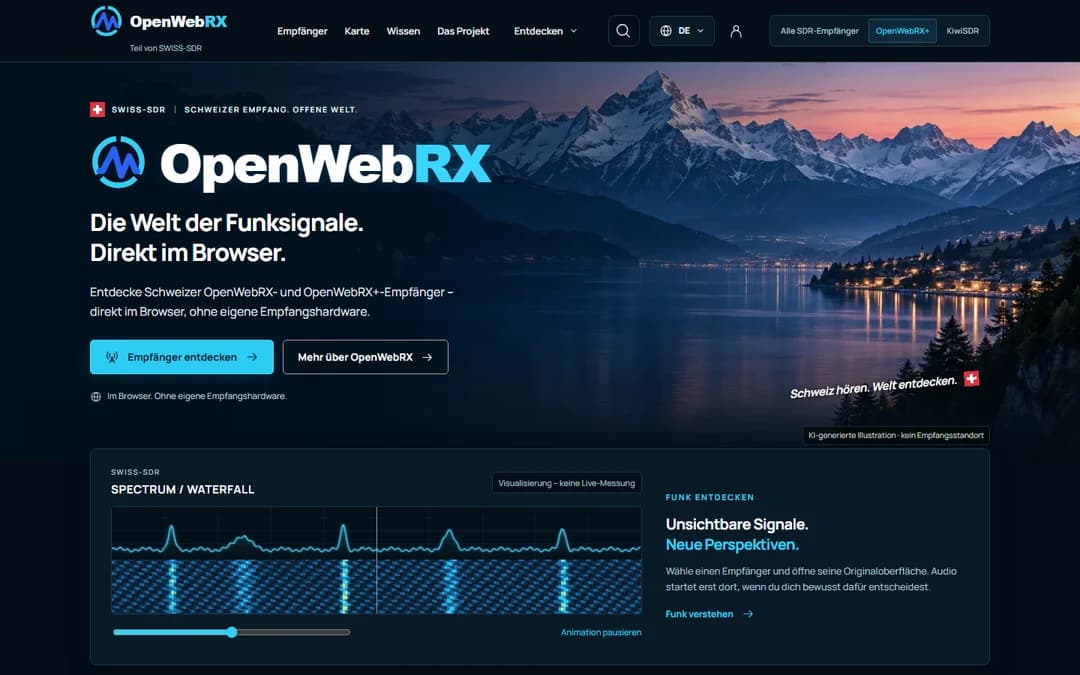
3portals · one shared database4languages · DE, FR, IT, ENSDROpenWebRX / OpenWebRX+ / KiwiSDR / Web-888
01 /
THREE PORTALS · ONE PLATFORM
A shared home for reception.
For radio amateurs, shortwave listeners, curious minds and beginners. You do not need your own antenna: the antenna and receiver are at the operator’s site.
Swiss-SDR
swiss-sdr.chThe shared platform
Open ↗The central overview for all supported receiver types: OpenWebRX, OpenWebRX+, KiwiSDR and Web-888. Accounts, operator tools and administration are brought together here.
OpenWebRX
openwebrx.chThe entry for OpenWebRX / OpenWebRX+
Open ↗A dedicated directory for this receiver software. The bands, profiles and modes offered by each receiver depend on its hardware and configuration.
KiwiSDR
kiwisdr.chThe entry for KiwiSDR
Open ↗A dedicated route to KiwiSDR locations. Directory information helps you choose; you operate the selected receiver through its original interface.
Are the portals reachable?
The three websites are checked automatically from the HB3YAQ server when this page opens. This does not confirm an available receiver or activity at my station.
Shared data. Distinct identities.
All three portals use the same database. Accounts, operator features and administration are centralised on Swiss-SDR. Each portal retains its own brand colours, homepage and thematic focus.
Explore radio.
Make reception possible together.
Swiss-SDR supports both sides of reception: people who want to listen and the people making their receiving equipment available.
Your next listening session starts with a good choice.
Find a location, understand its equipment and open a suitable receiver. No antenna or receiving hardware of your own required.
Search, filter and find frequenciesFrom a canton to a specific frequency: choose according to what you want to hear.+
Filter the directory by location, canton, platform, frequency range, mode, reachability and available access information. A search such as ‘7.1 MHz’ finds receivers whose published coverage includes that frequency.
Compact cards show an image, location, platform and status. Search terms and filters remain in place when switching between list, map and receiver details.
A reception map of SwitzerlandDiscover regions and shared receiving sites directly on the map.+
The interactive map shows where receivers are located. Services at the same site are grouped; map popups contain individual receivers, small images and links to their detail pages. Colours and accompanying text indicate reachability.
Private sites can use approximate positions. Exact coordinates are published only with the corresponding permission.
Equipment and people behind each siteA directory entry becomes an informative portrait of a receiving site.+
Detail pages bring together available information about platform, hardware, antenna, coverage, modes, location, operator and availability, alongside images and the listening link. Multiple KiwiSDR, OpenWebRX or Web-888 services at one site remain individually selectable.
Site portraits can include photos, history, distinctive features, antenna technology and reports. Optional operator profiles introduce the people involved. Suitable site illustrations may supplement missing photographs and are identified accordingly.
Reachability with a traceable historyOnline, offline, maintenance or unknown, with time and context.+
Regular checks record reachability, while a history shows past checks and interruptions. Planned maintenance is shown separately. Green and red make the state recognisable in the overview, with text alongside.
Password requirements and reported occupancy are shown only when the receiver supplies reliable information. Missing or stale information is not treated as confirmed availability. Checks do not open a listening session. Online guarantees neither a free listener slot nor reception quality.
Listen in your browserOpen the original receiver or deliberately start the embedded listening interface.+
Each listening link opens the receiver’s original interface. Each of the three portal homepages can also have a ‘Listen live’ area with a selected KiwiSDR, OpenWebRX or OpenWebRX+ receiver.
The connection begins only when you start it. Controls offer start and stop, a larger view, restoration of the initial preset and opening the receiver separately. A preset frequency and mode help you get started; you then operate the complete original interface.
Favourites, comparison and listening bookmarksKeep track of interesting receivers and your preferred settings.+
Save receivers as favourites and compare up to three directly. Your selection works across the three portals.
Signed-in users can create private listening bookmarks with a name, receiver and optional frequency and mode. The platform checks these settings against the published receiver information. Bookmarks can be searched, edited, deleted and reopened later.
Get started and understand SDRIllustrated guides connect the technology with its actual controls.+
‘Getting started & knowledge’ explains software defined radio and the path from antenna through receiving hardware and the Internet to your browser. OpenWebRX, OpenWebRX+, KiwiSDR and Web-888 are introduced individually, explaining the difference between receiver software and dedicated SDR hardware.
Step-by-step guides show how to open a receiver, choose frequency and mode, and use key controls. Mobile advice, common problems and interactive learning diagrams for AM and SSB sidebands complete the introduction.
Read reports and follow sitesFollow new receivers and stories from your favourite sites.+
News and project reports highlight developments. Operators can prepare site reports and submit them for publication. Approved reports appear in the news and alongside the relevant site.
Site subscriptions send account notifications about newly published receivers and reports. Optional email notifications can be switched off at any time. Routine online/offline checks do not trigger subscription notifications.
Run a receiving site. Make it discoverable together.
Maintain your receivers in one place, work with your team and show the site on your own website too.
- 1Private draft
- 2Submit for review
- 3Publish after approval
From draft to published receiverA guided process supports submission, review and ongoing maintenance.+
After registration and email verification, a wizard helps with address, equipment, coverage, location, images and further information. Save entries privately and submit them for review later. When updating a published receiver, its approved version remains visible until the revision has been reviewed.
The operator dashboard brings together receivers, tasks, checks and messages. Maintain or pause entries and manage maintenance windows. Existing receivers can be used as templates: the copy gets a new name and address and remains private initially.
Claim entries and maintain them as a teamClear responsibilities without sharing passwords.+
Existing receivers without an assigned operator can be claimed. The applicant must provide verifiable evidence of control over that specific receiver. Management is transferred only after administrative review.
Site teams allow invitations to registered users with explicitly assigned receivers. Permissions take effect after acceptance and can be revoked. A site can be maintained together without sharing account passwords or broad administrator access.
Your site on your club’s websiteMaintain centrally and reuse a light or dark site display elsewhere.+
A copyable embed code displays the public site overview on an external website. It includes published receivers, their last known status, the latest check and onward links, with light and dark appearances available.
The display regularly refreshes existing status information and does not open an audio connection. A club can show its receivers on its own site while continuing to manage them centrally through Swiss-SDR.
Carefully considered behind the scenes too.
Four languages, maintained content and clear responsibilities connect the three distinct portals.
DE / FR / IT / EN
Four languages, preview and version historyEdit content together and keep translations up to date with a clear history.+
German, French, Italian and English are organised in the same management area. Pages and articles support text, images, galleries, links, notes and other content blocks. Previews, comparison with the public version and scheduled publication support editorial work.
Previous versions can be restored as private drafts. When source text changes, translation tracking flags versions needing review. Editors can compare old and current text and explicitly confirm the review.
Media management and individual homepagesManage image rights and focal points, and give each portal its own homepage.+
Single and multiple uploads combine shared rights information with individual image descriptions. Image usage is traceable and images in use are protected against accidental deletion. A focal point controls crops with card, portrait and mobile previews, while the original is retained.
Featured receivers, their order, new publications and live listening can be configured per portal. The automatic ‘Popular’ label reflects sufficiently frequent receiver opens within a limited period. It describes usage, not reception quality.
Administration and quality assuranceOne workspace for users, content, sites and approvals.+
Administration manages users, receivers, sites, content, media, claims and revisions. Users can be searched, filtered, edited, blocked and unblocked. Permissions, password processes and verification are managed centrally.
Receivers can be added without operator accounts. A CSV/JSON import with preview initially creates drafts and accounts for existing addresses. Bulk actions support pausing, restoring visibility, assignment and maintenance planning. Tasks, quality filters, protected statistics and change logs support ongoing maintenance.
Use it on mobile and control your accountFour languages, light and dark modes, and personal control over data and sessions.+
Public pages and management tools are available in German, French, Italian and English on phones, tablets and computers. On supported devices, Swiss-SDR can be installed as a web app on the home screen or desktop.
Users control optional profile details, enable two-factor authentication, revoke sessions, export account data or delete their account. Statistics features depend on the corresponding consent. Contact, corrections and reports use the designated forms; receiver access conditions and usage rules remain the responsibility of each operator.
02 /
FROM RADIO SIGNAL TO AUDIO
The antenna is there. You listen here.
From the receiving site to your browser, shown as a simplified functional diagram. Open a stage to learn what it does.
01AntennaRadio at the receiving site
The antenna receives signals at its location. Its design, surroundings and feed line affect reception. Your own location is not the receiving site.
02SDRDigitise the signal
Receiver hardware conditions and digitises the signal. The actual system limits the frequency range and usable bandwidth.
03ServerProcess and serve
Receiver software processes data and provides the web interface. SDR and server may share one device or be separate components; processing is divided differently across systems.
04InternetTransfer data
Display and audio data travel to you; control inputs travel back to the receiver. This Internet connection is not a radio path between your home and the station you hear.
05BrowserTune and listen
Choose frequency, mode and filter in the provided interface. Start audio deliberately. A web receiver provides reception; you are not transmitting through it.
The receiving antenna’s location matters. Your browser shows what that system receives — the Internet carries the result from the receiver to you.
Explore the chain in the learning model →03 /
YOUR FIRST RECEPTION
From the directory to a signal.
Six steps, each followed by a quick check. You decide when to open an external receiver.
HB3YAQ · Ajdin HadzicLearning to take awayhttps://hb3yaq.ch/en/projects/swiss-sdr
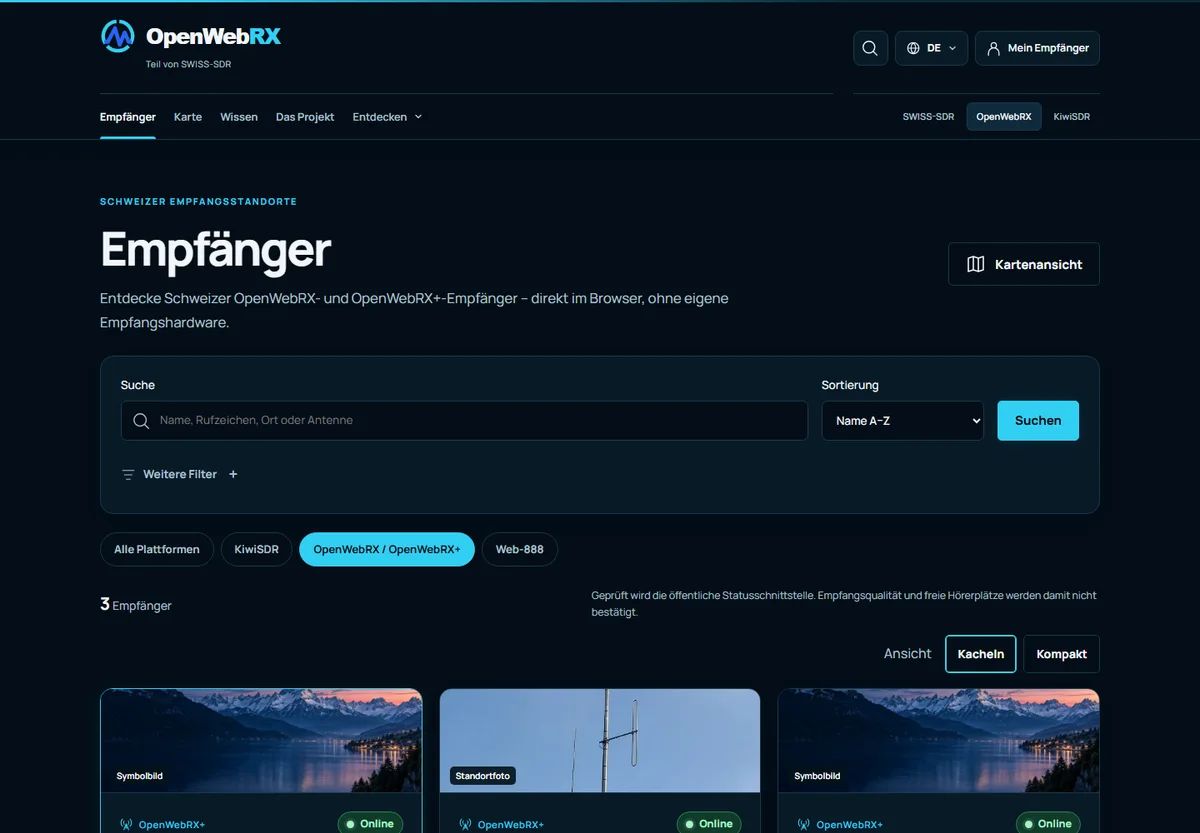
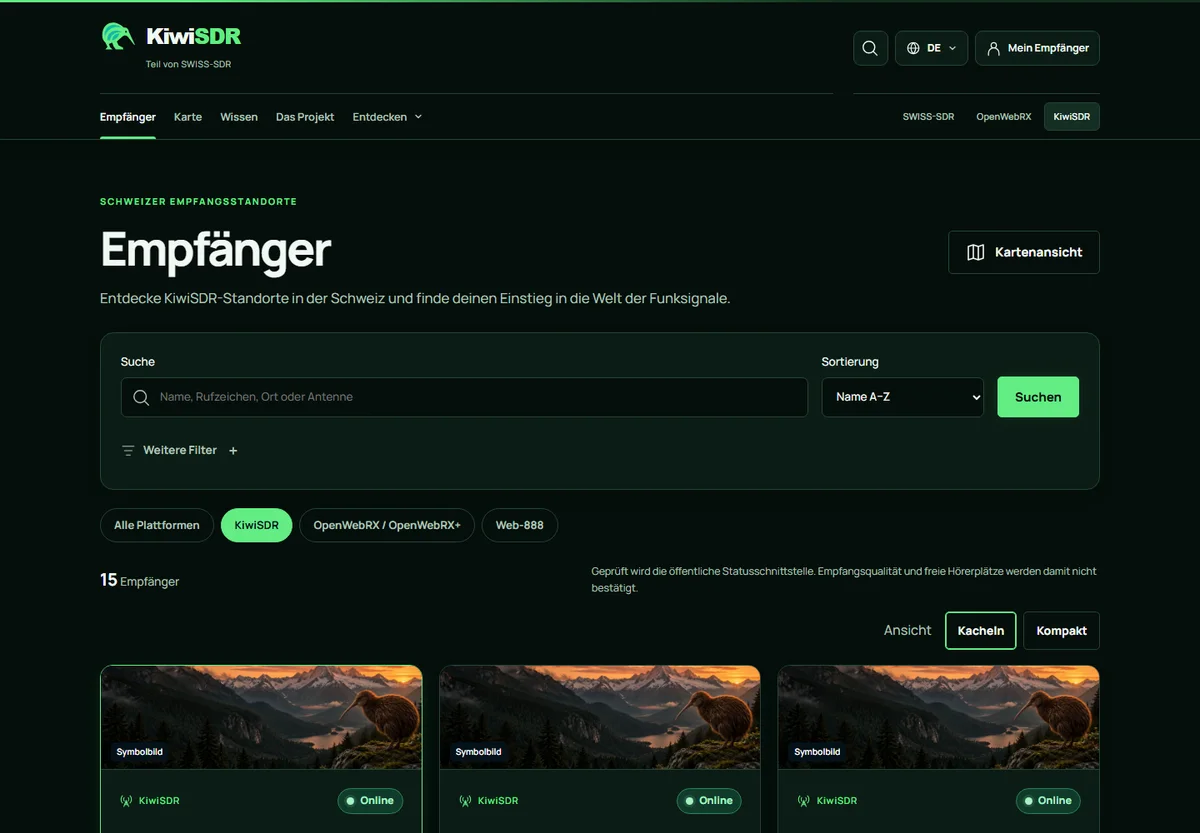
The captures show the German portal interfaces at that time. Visible counts and status markers are historical image content; check the relevant portal for its current state.
Choose your starting point
Open the shared Swiss-SDR directory or one of the specialist portals. You do not need your own receiving hardware for this first attempt. A browser and Internet connection provide access; the selected receiver’s usage conditions still apply.
Your checkYou are in the directory and can see receiver entries; you have not opened a listening session yet.
Check location and coverage
Use the search and filters. Read the entry’s frequency coverage, antenna information and notes. Choose a receiver that covers the desired range. An online marker alone confirms neither free listening slots nor good reception.
Your checkYou can identify where the antenna is located and whether your desired range is offered.
Open the original receiver
Open the entry’s details if needed, then its listening link. You leave the portal for the operator’s website. If the receiver is busy or unreachable, choose another entry and follow the instructions shown there.
Your checkThe receiver interface has loaded. Its features may differ between systems.
Start audio and get oriented
Start audio in the receiver interface if it asks for activation, beginning at low volume. Check browser muting and audio output. Locate the frequency display, mode and filter. OpenWebRX may require selecting an appropriate receiver profile first.
Your checkYou can find the tuning controls and deliberately turn audio on and off.
Tune a signal
Choose a visible trace or an appropriate frequency marker. Tune accurately and select the signal’s mode: for example AM for an AM broadcaster, or USB/LSB for speech transmitted on that SSB sideband. Adjust the filter to include the wanted signal while excluding neighbouring signals where possible.
Practise tuning in the simulated SDR lab first →Your checkChange one setting at a time. A broader trace alone does not reliably identify the mode.
Make sense of what you observed
Note the receiver, frequency, mode and time for yourself. If nothing becomes intelligible, first check mode, filter and audio. Another receiving site or time of day can then help you compare. End the connection when finished so that a listening slot can become available again.
Your checkYou are describing an observation at this receiver. It does not establish reception conditions at your own location.
Still no intelligible audio?
Troubleshooting guides you through audio, connection, tuning and reception. The learning lab lets you try mode and filter settings without a real receiver connection.
04 /
DESIGN & DOCUMENTED STATE
How the project is organised.
The portals make reception discoverable and understandable. The actual receivers remain with their operators, with their own equipment, access conditions and usage rules.
- Dedicated entry points
- OpenWebRX and KiwiSDR retain their own portals. Selection starts with the relevant receiver system, while Swiss-SDR provides the shared context.
- Listen at the original source
- The platform links to public original receivers. Receiving equipment remains with its operator. A directory listing does not mean that a station belongs to my own collection.
- Keep information traceable
- Operators maintain their information; new entries and revisions are reviewed before publication. Equipment information, check times and status history help put each receiver in context.
HERE ON MY WEBSITE
Swiss-SDR provides the reception entry points. Here on my personal website, I connect the project with explanations, learning paths and simulations. The existing portals remain independently accessible.
Explore my planned experiments too →Sources & next steps
Project description: October 2026. Portal captures date from 15 October 2026. Check the portals for current receiver status. The OpenWebRX documentation explains software and operation in greater depth; actual reception features depend on the selected system.
Learn the receiver controls →